

Description
Browser-Based RDP Access Without Installation
AccessNow RDP Client by Ericom enables seamless, browser-based access to Windows applications and desktops from any device with an HTML5-compatible browser. Designed for remote work environments, it allows users to connect to TS/RDS/VDI-hosted applications—such as Microsoft Office, Adobe tools, Webex, and custom enterprise software—without installing client software. The solution is ideal for organizations embracing BYOD policies, IT teams seeking reduced support overhead, and users working across diverse platforms including Chromebooks, Macs, Windows PCs, Linux systems, Android tablets, and iOS devices. Its zero-install model eliminates the need for endpoint configuration, plug-ins, or complex setup, streamlining access while enhancing security through integration with Ericom Secure Gateway and SSL VPNs. Real-world use cases include remote employees accessing corporate desktops from home, field technicians using lightweight devices, and educational institutions supporting hybrid learning models. The software supports over 35 languages, making it accessible across global teams. While specific performance metrics were not provided, the browser-based architecture suggests efficient resource utilization on supported devices.
Key Features & Capabilities
- Zero-Client Installation – Users can access Windows applications and desktops directly through a web browser without installing any software, plug-ins, or drivers on the endpoint device. This simplifies deployment and reduces IT maintenance costs.
- Multi-Platform Support – Compatible with Windows, Mac, Linux, Chrome OS, Android, and iOS devices, enabling consistent remote access across diverse hardware ecosystems.
- Browser-Based Access – Leverages HTML5 technology to deliver a responsive and functional remote desktop experience directly within Chrome and other modern web browsers.
- Integration with RDS, VDI, and Virtualized Environments – Works with Terminal Server (TS), Remote Desktop Services (RDS), and Virtual Desktop Infrastructure (VDI) platforms, supporting applications like Word, Excel, PowerPoint, Publisher, Adobe Suite, and Webex.
- Support for Multiple Languages – Offers keyboard and interface support for over 35 languages, including Japanese, Korean, and Chinese, ensuring usability across international teams.
- Secure Access via Ericom Secure Gateway – Enhances security by encrypting connections and providing centralized access control, compatible with leading SSL VPNs such as Juniper and Cisco.
- Simple Connection Workflow – Users only need to open a web page, enter the Access Server address, input credentials, and press 'Connect'—the remote desktop or application appears within the browser window.
User Interface, Workflow & Performance
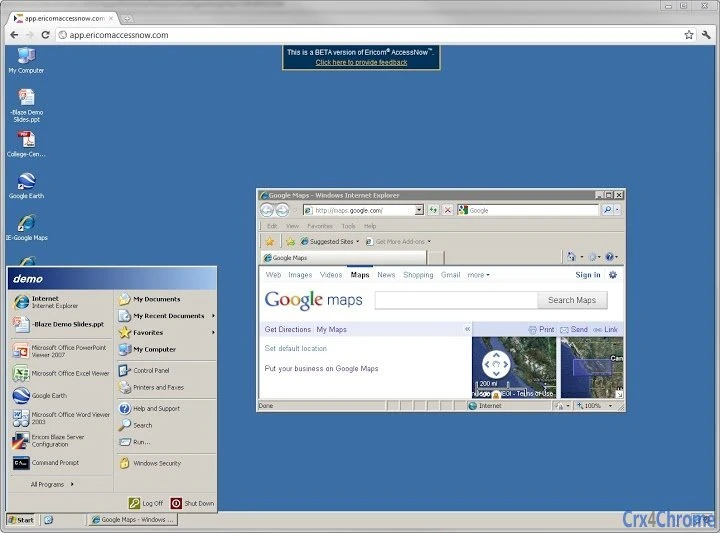
The user interface of AccessNow RDP Client is minimalist and focused on functionality. It operates entirely within a web browser, presenting the remote desktop or application in a dedicated window without additional UI clutter. Navigation is intuitive: users enter the server address and credentials directly in the browser, then initiate the connection with a single click. The workflow is streamlined, eliminating multiple steps typically associated with traditional RDP clients. The browser-based nature suggests efficient use of system resources, though exact CPU and RAM behavior were not specified. Performance may vary depending on network conditions and server load, but the lack of client software reduces potential bottlenecks. Stability is expected to be high due to reliance on standard web technologies, which are continuously updated and maintained by browser vendors. The developer did not provide detailed performance benchmarks or load testing data. General software behavior patterns suggest responsiveness on modern devices with stable internet connections. No reported issues with crashes or freezes were mentioned in available documentation.Compatibility & System Requirements
AccessNow RDP Client is designed to run on Windows, Mac, Linux, Chrome OS, Android, and iOS operating systems. It requires an HTML5-compatible web browser such as Google Chrome or other modern browsers. The installation size is 15.2 MB, though this refers to the server-side component, not the client. The client itself is browser-based and does not require a traditional installation process. The developer did not specify exact system requirements for the client-side device, including minimum RAM, CPU, or storage. Compatibility with specific hardware configurations was not detailed. The software is intended for use with RDP hosts such as Windows XP, Windows 7 Professional and higher, Windows Server 2003, 2008, 2008 R2, 2012, and 2012 R2. The Access Server component must be installed on the host system. The developer did not provide information about compatibility with newer Windows Server versions beyond 2012 R2.Pros and Cons
Pros
- Zero installation required on endpoint devices
- Works across multiple operating systems and device types
- Simple, intuitive connection process
- Supports a wide range of enterprise applications and virtualized environments
- Enhanced security through integration with Ericom Secure Gateway and SSL VPNs
- Multi-language support for global teams
- Reduced IT support overhead and maintenance costs
Cons
- Dependent on stable internet connection for optimal performance
- Browser compatibility may vary across older or non-standard browsers
- Server-side component must be installed and maintained
- Performance may be affected by network latency or bandwidth limitations
- Limited control over client-side configuration due to zero-install model
FAQ Section
Is AccessNow RDP Client free to use?
Yes, AccessNow RDP Client is available at no cost. The software is provided as a free tool for accessing Windows applications and desktops through a web browser.
Which operating systems are supported?
AccessNow RDP Client supports Windows, Mac, Linux, Chrome OS, Android, and iOS devices. It operates within any HTML5-compatible web browser on these platforms.
Do I need to install software on my device?
No, the client is browser-based and requires no software installation, plug-ins, or drivers on the endpoint device. Access is achieved simply by opening a web page.
Can I use AccessNow with my existing RDS or VDI setup?
Yes, AccessNow is compatible with Terminal Server (TS), Remote Desktop Services (RDS), and Virtual Desktop Infrastructure (VDI) platforms. It can connect to existing Windows application and desktop environments hosted on these systems.
Is AccessNow secure for remote access?
Yes, AccessNow supports secure access through Ericom Secure Gateway and integration with SSL VPNs like Juniper and Cisco. This ensures encrypted connections and centralized access control for enhanced security.
Final Thoughts & CTA
AccessNow RDP Client by Ericom delivers a modern, secure, and accessible solution for remote desktop and application access. Its browser-based architecture eliminates the need for client software, making it ideal for organizations with diverse device fleets and strong BYOD policies. The simplicity of connecting via a web browser—enter the server address, input credentials, and press 'Connect'—makes it highly user-friendly. With broad compatibility across platforms and support for over 35 languages, it serves global teams effectively. While performance depends on network quality and server load, the lack of client-side overhead contributes to a stable and efficient experience. For IT administrators, it reduces deployment complexity and support demands. For end users, it offers seamless access to essential tools from any device. The free licensing model enhances its appeal for both small teams and large enterprises. Download AccessNow RDP Client now.Guides & Tutorials for AccessNow by Ericom (RDP client) App for Chrome
How to install AccessNow by Ericom (RDP client) App for Chrome
- Click the Preview / Download button above.
- Once redirected, accept the terms and click Install.
- Wait for the AccessNow by Ericom (RDP client) App for Chrome download to finish on your device.
How to use AccessNow by Ericom (RDP client) App for Chrome
This software is primarily used for its core features described above. Open the app after installation to explore its capabilities.
User Reviews for AccessNow by Ericom (RDP client) App for Chrome 0
No reviews found





